🚀 Join 1M+ traders with Exness — Start trading with just $10, withdraw at any time Start Trading
Grid Trading EA
$125.00

- or $100 if paid with crypto -

Buy for MetaTrader 4
Instant Download

- or buy from MQL5 App Store -

For MetaTrader 4 For MetaTrader 5
GRID TRADING EA FOR METATRADER

Extract profits from the market regularly

This Expert Advisor is designed to systematically extract value from recurring market volatility. By placing trades at predefined price levels, it captures natural price oscillations without relying on market predictions—giving you full control over direction, exposure, spacing, and execution.

  • Extracts money from recurring market volatility through structured price levels
  • No forecasting required — trades the natural oscillation of price
  • Fully controlled grid: define spacing, number of trades, and exposure
  • Directional or bidirectional modes to adapt to market conditions
  • Built-in risk visibility: monitor exposure and floating positions in real time
  • Multiple behavior modes: regular, classic, paused, and averaging exit
  • Custom profit targets and price limits for controlled execution
  • Works across all symbols and timeframes — forex, indices, CFDs, futures
  • No indicators, no signals — pure mechanical price-based strategy
  • Start, pause, or reset the grid at any time with full manual control

Video

Screenshots

Description

Grid trading is an efficient mechanical trading strategy which has no reliance on direction, profits from volatility and uses the intrinsic wavy nature of the market. It uses fixed price levels to enter and exit trades in one or both directions. Such trades, generally spaced at 20-200 pip intervals, create a trading grid.

Advantages 

  • Easy to set up and supervise
  • It is time-frame independent
  • No indicators or hard analysis needed
  • Trades price ranges, not trading setups
  • Requires little forecasting of the market
  • Extracts money out of the market regularly

Features

  • It can trade long, short or bidirectional
  • It can trade many simultaneous symbols
  • Grids can be closed or paused at the trader's discretion
  • It implements directional and bidirectional profit targets
  • It doesn't trade open ended grids, exposure is limited
  • The grid configuration can be changed on the fly
  • Risk and exposure is pre-calculated and displayed
  • It implements three different behaviors
  • It works for forex, CFDs and futures

This is arguably the most flexible Grid Trading EA you'll ever find and can be used in a myriad of different ways.

How to get started

  1. Load the EA to any chart and timeframe
  2. Choose a trading direction (buy, sell or bidirectional)
  3. Edit the spacing and amount of trades until risk is acceptable
  4. Start the grid

Usage Tips

  • If the market is cheap, trade long only
  • If the market is overpriced, trade short only
  • Don't feel obligated to do bidirectional trading
  • Don't load the EA twice on the same symbol
  • Avoid trading in a direction with big swap costs
  • Favor trading in a direction with positive swaps (earn swaps)
  • Trade from a VPS or leave your trading computer turned on 24/5
  • Do not unload the EA to assure the atomicity of the process
  • There is no need to change the Magic Number from symbol to symbol
  • Use the phase (cash-in multiplier) of each grid to compensate floting point
  • Set a price limit for each grid on inputs to increase the profitability
  • Use the profit targets to reset the grid regularly

Technical Information

  • The EA evaluates at M1 bar closing
  • Swap costs are displayed in the chart
  • Trades have no stop-loss or take-profit orders
  • The EA uses market orders, spread is not an issue
  • The EA won't trade live if there is risk of a margin call with current settings
  • However, the EA will trade in the tester with any settings, regardless of risk
  • The EA trades a manual lot size: the tester won't reflect compounding profits
  • When all trades are placed, the oldest trade is closed at a loss and the EA keeps trading

Input Parameters

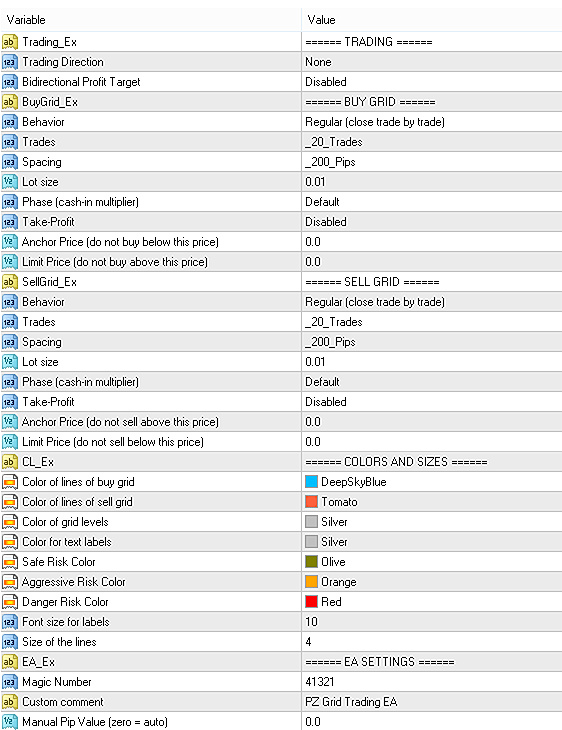
  • Trading Direction: It can be long, short or bidirectional.
  • Bidirectional Profit Target: Combined profit target for the bidirectional grid.
  • For each trading direction:
    • Behavior
      - Regular: The grid operates normally, adding and closing trades.
      - Classic: The grid closes completely when it is exhausted. 
      - Paused: It sits idle. Trades are not placed not closed. 
      - Averaging: Tries to exit the grid at the  average price of all trades.
       
    • Trades: The amount of trades in the grid. More trades means more risk.
    • Spacing: Distance in pips between trades. More spacing means more risk
    • Lotsize: The lotsize of each trade of the grid. More lotsize means more risk
    • Phase: The cash-in multiplier for the trades. Use it to amplify profits.
    • Take Profit: The profit target to reset the grid. Use it when you want to contract the grid.
    • Limit Price: The price at which you don't want the EA to keep trading (zero = not used)
    • Anchor Price: The reference price for the grid at which the EA also stops trading (zero = not used)
  • Colors and sizes: This block of parameters hold visual related options.
  • Magic Number: The EA uses the magic number to identify its trades
  • Custom Comment: Enter your custom comment for trades
Disclaimer

This Expert Advisor (Robot) is a tool for automated trading and is designed to execute trades based on predefined rules. It does not constitute financial advice, investment recommendation, or any guarantee of profits.

Automated trading involves a high risk of loss and can result in the loss of your entire capital. Factors such as slippage, technical failures, changing market conditions, and broker execution can significantly affect performance. Past performance is not indicative of future results. No robot is foolproof.

Use this Expert Advisor at your own risk and only with money you can afford to lose.

For complete details, please read our Terms and Conditions.
Reviews

Verified reviews from third party sources
Cristian Caula
From MQL5

Excellent expert advisor for the creation and management of grids. Currently the best!

⭐⭐⭐⭐⭐
Bruce Raymond
From MQL5

Excellent tool! I’ve been using PZ Grid Trading for years on MT4, and now that more brokers are being forced to move to MT5, I’m glad the new version works pretty well.

⭐⭐⭐⭐⭐
Ko-Hei Nyu-Yonezo
From MQL5

This system is one of the best grid trading systems I've ever used, but it requires your trading skill at the same time.

⭐⭐⭐⭐⭐

Frequently Asked Questions

Not exactly. Grid trading involves placing multiple trades at fixed price intervals using consistent lot sizes. Martingale, on the other hand, increases trade size after losses to recover previous losses. This EA does not multiply position sizes and therefore is not a martingale strategy, although risk must still be carefully managed.

Yes, like any leveraged trading strategy, grid trading carries inherent risk. Misconfigured grids—such as using too much leverage or setting narrow spacing—can lead to large drawdowns. However, when properly sized and managed, grid trading can be both profitable and adaptable to various market conditions.

No, the EA is not compliant with NFA/FIFO regulations and should not be used with U.S.-regulated brokers that enforce these rules.

No, this EA does not use conventional stop-loss orders. Risk is managed through grid configuration—specifically, spacing, trade count, and lotsize. You are encouraged to set conservative risk parameters and limit trading when necessary. You can manually stop trading if a certain drawdown threshold is reached.

This EA works on any symbol and is time-frame independent. It can be used effectively on forex pairs, commodities, indices, and CFDs. Since it reacts to price levels rather than indicators or patterns, it does not rely on chart timeframe.

Directional grids work best in trending or fundamentally biased markets—trade long in undervalued markets, or short in overbought conditions. Bidirectional grids are more suited for sideways markets. Avoid bidirectional trading if you're unsure about swap costs or direction.

The EA uses market orders for grid execution, so it responds immediately to price movements and does not rely on pending order fills.

Yes, the EA supports running grids on multiple symbols simultaneously. However, never load it twice on the same symbol to avoid conflicts. Each grid operates independently, identified by its magic number.

Yes, one of the strengths of this EA is that you can adjust most grid parameters—including trade count, spacing, lotsize, behavior mode, and limit prices—on the fly while it’s operating.

(a) Regular: Trades are opened and closed normally across the grid until profit targets are met. (b) Classic: The grid closes completely when it reaches its profit target or configured exhaustion. (c) Averaging: Trades aim to close around the average price of all open positions, useful in trending markets with retracements.

Ensure the maximum grid exposure doesn’t exceed 3x your account equity and use spacing wide enough to reach meaningful market levels like support or resistance zones. Set price limits to avoid overextending during extreme volatility.

Yes, the EA displays key metrics such as current exposure, swap costs, and directional risk directly on the chart, giving you full transparency over the grid’s operation.

Yes, the EA is designed to recover grid state and resume trading without issue after reconnections, provided it has not been unloaded or misconfigured during the process.

Yes, a VPS is highly recommended to ensure uninterrupted grid operation 24/5. This is especially important for maintaining trade consistency and atomic execution during high market activity.